How to Get a Virtual Business Address (Step-by-Step Guide)


To get a virtual business address, you choose a city and provider, sign up online, complete USPS Form 1583 (a federal identity requirement for mail handling), and start using your new address immediately. The entire process typically takes less than 24 hours. With Opus Virtual Offices, plans start at $99 per month and include a live receptionist, business phone number, and mail handling at over 650 U.S. locations, with no long-term contract required.
What to Know Before You Get Started
A virtual business address is a real commercial street address at a physical office building. It is different from a P.O. box, which most states reject for LLC registration and which Google will not accept for Business Profile verification. When you sign up with a provider like Opus Virtual Offices, you get a suite number at an actual office building in the city of your choice.
Before picking a provider, there are three things worth thinking through: which city makes the most sense for your brand or client base, what services you need beyond just the address itself, and whether you want a month-to-month plan or are open to a longer commitment. Opus offers all plans month to month with no contracts, which gives you flexibility as your business grows.

How to Get a Virtual Business Address: 4 Steps
Step 1: Choose Your City and Address
Start by deciding which city you want your business address to be in. This does not have to be the city you live in. Many business owners choose a city based on where their clients are located, where their industry is concentrated, or simply which market they want to establish credibility in.
Opus has 650-plus locations across the United States, including major cities like New York, Los Angeles, Miami, Chicago, Houston, Atlanta, Dallas, Nashville, and Beverly Hills. If you serve clients nationally or want a presence in multiple markets, you can add addresses in multiple cities under one account.
When comparing addresses, look at the specific building, not just the city. A recognizable street in a commercial district carries more weight with clients and banks than an obscure zip code. Opus locations are in real commercial office buildings, not mailbox stores or strip mall suites.
Step 2: Sign Up Online
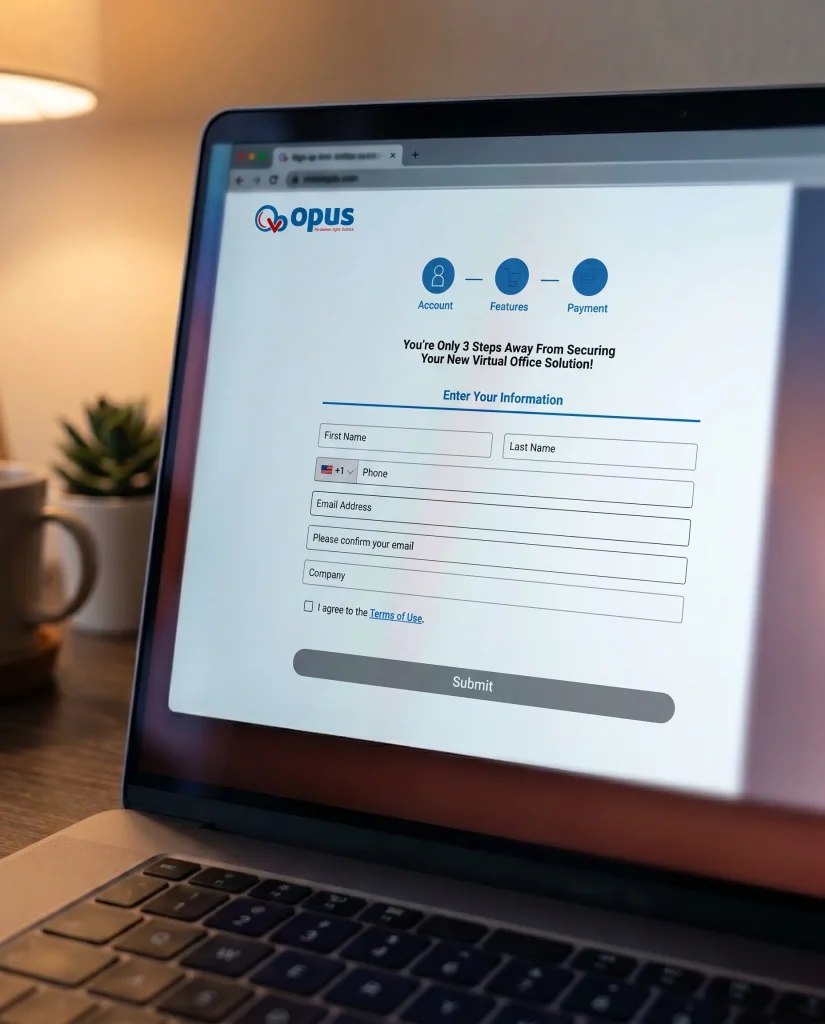
Once you have chosen your city and location, signing up takes just a few minutes online. You will select your plan, provide your business name, and choose your local phone and fax number. No lease negotiation, no in-person visit, and no security deposit.
The Opus all-inclusive plan is $99 per month and covers everything: the business address, live receptionist call answering Monday through Friday from 8:30am to 5:30pm, a dedicated business phone and fax number, mail handling, voicemail forwarded to your email as audio files, faxes forwarded as PDFs, two voicemail boxes, and business credit reporting through Moody’s. If you need add-ons like outbound calling, texting from your business number, a toll-free line, or appointment scheduling, those can be added at any point.
Step 3: Complete USPS Form 1583
This is the step most guides skip over, so it is worth explaining clearly. USPS Form 1583 is a federal authorization form that allows a commercial mail receiving agency to accept mail on your behalf. It is a legal requirement, not optional, and every legitimate virtual address provider will ask you to complete it.
The form requires two forms of identification, one of which must be a photo ID. Most providers, including Opus, handle the process digitally. You fill out the form online, upload your ID documents, and in many cases have it notarized electronically. Some providers accept a digital notary; others require a physical notary signature depending on their process. Opus walks you through this during onboarding so you know exactly what to submit.
Once you complete and verify Form 1583, your provider can legally receive mail addressed to your business at that location.
| Form 1583 Requirement | Details |
| Who needs it | Any business using a commercial mail receiving agency for mail handling |
| What it does | Authorizes the provider to legally accept mail on your behalf |
| ID required | Two forms of ID, at least one must be a government-issued photo ID |
| Notarization | Required, many providers offer digital notary options |
| How long it takes | Usually completed same day or within 24 hours with digital notary |
| Who handles it | Your virtual address provider guides you through the process |
Step 4: Start Using Your Address
Once your account is active and you have submitted Form 1583, your virtual business address is live and ready to use. Most businesses update the following right away:
- Business website (contact page, footer, About page)
- Google Business Profile (create or update your listing for local search visibility)
- LLC or corporation filings (new formation or amendment if switching from a home address)
- Business bank account application
- Business cards and email signature
- Invoices and client contracts
- LinkedIn company page and other business directories
One note worth flagging: if you are switching from a home address that is already on public record from a previous LLC filing, the old address will remain in historical state records. You can file an amendment to update your registered address going forward, but cached versions of the old address may persist in some databases for a period of time. Getting your virtual address before forming your LLC avoids this entirely.
What to Look for in a Virtual Address Provider
Not all virtual address services are the same. Some providers offer the address only and charge separately for every additional service. Others bundle everything into a flat monthly rate. Here is what to compare before signing up:
| What to Check | Why It Matters | Opus Virtual Offices |
| Real street address (not a mailbox store) | Required for LLC registration, Google, and most banks | Yes, commercial office buildings only |
| Live receptionist included | Answering calls in your company name adds real credibility | Yes, M-F 8:30am to 5:30pm, included |
| Business phone + fax number included | Separates your personal and professional lines | Yes, included |
| Mail handling included | Core function of a virtual address | Yes, included |
| No long-term contract | Flexibility as your business grows or changes | Yes, month to month |
| No hidden fees | Total cost clarity upfront | Yes, $99/month all-inclusive |
| Number of U.S. locations | More locations means more city options | 650-plus locations nationwide |
| Meeting rooms available | Useful when you do need to meet clients in person | Yes, on-demand booking |
How Long Does It Take to Get a Virtual Business Address?
With most providers, including Opus, the process from signup to active address takes less than 24 hours. Signing up online takes about five to ten minutes. Completing Form 1583 with a digital notary can be done the same day in most cases. Once you submit and verify it, your address goes live and is ready to use.
Compare that to a traditional office lease, which typically involves site visits, credit checks, legal review, a multi-month negotiation process, and a security deposit equal to one to three months of rent. A virtual business address is not just cheaper. It is faster by weeks.

Ready to Get Your Virtual Business Address?
Getting a professional business address does not require a lease, a deposit, or weeks of paperwork. With Opus Virtual Offices, you can have a real commercial address in 650-plus U.S. cities, a live receptionist, a dedicated business phone number, and full mail handling for $99 per month, with no long-term contract and no hidden fees.
The whole process takes less than a day. Your address is ready to use on your website, your Google listing, your LLC filing, and your business bank account application as soon as you are set up.
Frequently Asked Questions
Do I need a virtual address to form an LLC?
You do not need a virtual address specifically, but you do need a real street address, not a P.O. box, for most LLC filings. If you work from home and do not want your personal address on public record, a virtual business address is the most practical solution.
What is USPS Form 1583 and do I have to fill it out?
Yes. USPS Form 1583 is a federal requirement that authorizes a commercial mail receiving agency to accept mail on your behalf. Every legitimate virtual address provider will require you to complete it. Most providers, including Opus, handle the process digitally with an option for electronic notarization.
Can I use a virtual business address in a different city than where I live?
Yes. Your virtual business address does not have to be in your home city. Many business owners choose an address in the city where their clients are based, where their industry is concentrated, or where they want to build brand presence. Opus has 650-plus locations across the U.S., so you have wide flexibility.
How much does a virtual business address cost?
Prices vary by provider and what each plan covers. Basic address-only services can run $10 to $30 per month, but typically charge extra for everything else. Opus Virtual Offices charges $99 per month for a fully loaded plan that includes the address, live receptionist, business phone and fax number, mail handling, voicemail to email, and more, with no hidden fees and no long-term contract.
Can I get a virtual address before I form my LLC?
Yes, and it is often the smarter move. If you use a home address when filing your LLC and later switch to a virtual address, your home address stays on public record permanently in your state’s filings. Getting your virtual address first means your personal information never appears in business registration documents.
Can I use a virtual address for my Google Business Profile?
Yes. Google requires a real, physical street address for Business Profile verification, and a virtual address at a commercial office building qualifies. A P.O. box does not. Having a verified Google Business Profile in your target city helps your business appear in local search results, which is one of the more underrated SEO benefits of a virtual office.
Get Your Office Solution Today!
Join over 20,000+ businesses already growing with Opus VO.
Related Posts
View all posts
Is a Virtual Office in Los Angeles Right for Your LLC? Pros, Cons & Legal Insights
A virtual office gives your LLC a real commercial address in Los Angeles, mail handling, and a business phone presence without a lease. For the designated office address California asks for on your formation paperwork, it generally works. For your agent for service of process, which California treats as a separate requirement with stricter rules,

Is a Virtual Office in Los Angeles Right for Your LLC? Pros, Cons & Legal Insights
A virtual office gives your LLC a real commercial address in Los Angeles, mail handling, and a business phone presence without a lease. For the designated office address California asks for on your formation paperwork, it generally works. For your agent for service of process, which California treats as a separate requirement with stricter rules,

The Difference Between a Virtual Address and a Virtual Mailbox.
A virtual mailbox is a mail service. A virtual address is a business location. The mailbox solves the problem of managing physical mail from anywhere. The address solves the problem of where your company exists on paper, meaning your filings, your website, your invoices, and your listings. They overlap because most virtual addresses include mail
The Difference Between a Virtual Address and a Virtual Mailbox.
A virtual mailbox is a mail service. A virtual address is a business location. The mailbox solves the problem of managing physical mail from anywhere. The address solves the problem of where your company exists on paper, meaning your filings, your website, your invoices, and your listings. They overlap because most virtual addresses include mail

Does Your Trucking Company Need a Business Office?
If you run your own authority, there is a business operating behind your truck whether you set one up or not. Invoices, insurance certificates, registrations, driver records, broker packets, and regulatory mail keep arriving while the truck is moving. A business office gives that side of the operation somewhere to live: a professional location, mail

Does Your Trucking Company Need a Business Office?
If you run your own authority, there is a business operating behind your truck whether you set one up or not. Invoices, insurance certificates, registrations, driver records, broker packets, and regulatory mail keep arriving while the truck is moving. A business office gives that side of the operation somewhere to live: a professional location, mail
Most Popular Cities
Over 650 Locations Across the USA
All-Inclusive Virtual Office Services for Only $99