How to Set Up a Google Business Profile With a Virtual Office Address

Getting your business on Google is a crucial step you can take for visibility, credibility, and local search rankings. But for entrepreneurs, remote teams, and growing companies that do not operate out of a traditional office, the process can feel confusing. How do you list a real address when you work from home or travel between locations?
A virtual office address solves that problem. With a professional business address, you can create and verify a Google Business Profile (formerly Google My Business) that puts your company on the map, literally, without needing to lease physical office space.
This guide walks you through exactly how to set up a Google Business Profile using a virtual office address, from choosing the right address to optimizing your listing for local search.
| Quick Note: Google Business Profile is the updated name for what was previously called Google My Business. The terms are sometimes used interchangeably, but all new setup and management now happens at business.google.com. |
What Is a Virtual Office Address and Why Does It Matter for Google?

A virtual office address is a real, physical street address at a commercial building that businesses can use for mail, registration, and professional presence without renting desk space full time. Providers like Opus Virtual Offices offer addresses at prestigious locations in major cities across the United States.
For Google Business Profile purposes, the address you list needs to meet a few key requirements. It must be:
- A real, physical address (not a P.O. box)
- A location where your business can receive mail or have staff available during listed hours
- Accurate and consistent with your business registration documents
- Associated with a business category that makes sense for the address type
Virtual office providers specifically offer addresses designed to meet these criteria. Because the building is a real commercial property with staff on site, it satisfies Google’s requirement for a verifiable physical location.
Before You Start: What You Need
Getting set up goes faster when you have everything ready in advance. Before you open Google Business Profile, gather the following:
- Your virtual office address (full street address, suite number, city, state, ZIP)
- A Google account (personal or a dedicated business Gmail)
- Your business name exactly as it appears on registration documents
- A working phone number for your business
- Your business website URL
- Your primary business category (e.g., Law Office, Marketing Agency, Financial Services)
- A description of your services (you will use this later for the profile bio)
| Pro Tip:Use the same business name, address, and phone number (NAP) across every online directory, your website, and your Google profile. Consistency signals to Google that your business information is trustworthy, which supports your local SEO rankings. |
Step-by-Step: How to Set Up Your Google Business Profile
Follow these steps to create and verify your listing using a virtual office address.
| 1 | Go to business.google.com Sign in with your Google account and click ‘Manage now’ or ‘Add your business to Google.’ |
| 2 | Enter your business name Type your exact business name. If a listing already exists, Google may prompt you to claim it rather than create a new one. |
| 3 | Choose your business category Select the primary category that best describes what you do. This directly impacts which local searches your profile appears in. |
| 4 | Add your virtual office address Select ‘Yes’ when asked if you have a location customers can visit, then enter your full virtual office address including the suite number. |
| 5 | Set your service area (optional) If you serve customers outside your office address, you can add service areas by city, region, or ZIP code. This is useful for remote or mobile businesses. |
| 6 | Add your phone number and website Enter your business phone number and website URL. These help customers contact you and support your local search ranking. |
| 7 | Choose your verification method Google will offer options to verify your address, most commonly by postcard. Select your preferred method. |
| 8 | Complete your profile Add business hours, photos, a description, and any additional categories. The more complete your profile, the better it performs in search. |
How Google Verifies Your Business Address

Verification is how Google confirms your business is real and located where you say it is. For a virtual office address, the most common method is postcard verification, but several options may be available depending on your account history and business type.
| Method | How It Works | Timeline |
| Postcard | Google mails a card with a verification code to your address | 5 to 14 days |
| Phone or Email | Instant code sent to your registered contact info (not always available) | Immediate |
| Video Verification | Live video review with a Google representative to confirm your location | Same day to a few days |
For virtual office addresses, postcard verification is the most reliable option. Your virtual office provider receives mail at the address on your behalf, so the postcard will arrive there. Contact your provider in advance to let them know to expect and hold your mail.
| Important: Make sure your virtual office plan includes mail receiving or mail forwarding services before you start the verification process. Some plans only include the address for registration use, not physical mail handling. |
Optimizing Your Google Business Profile After Verification
Getting verified is just the beginning. A complete, well-optimized profile significantly outperforms a bare-bones listing in local search results. Here is what to focus on after verification:
Add High-Quality Photos

Google profiles with photos receive significantly more clicks and direction requests than those without. Upload photos for each of these categories:
- Exterior and interior shots of your virtual office building
- Your team, logo, and branded materials
- Products, work samples, or service visuals
- A cover photo that represents your brand clearly
Write a Keyword-Rich Business Description
Your business description (up to 750 characters) is prime real estate for relevant keywords. Include your primary service, location, and the types of clients you serve. Avoid keyword stuffing. Write for people first, search engines second.
Select the Right Categories
Your primary category has the biggest impact on which searches trigger your listing. Add secondary categories to broaden your reach. For example, a consulting firm might list ‘Business Management Consultant’ as primary and ‘Financial Consultant’ and ‘Marketing Consultant’ as secondary.
Keep Your Hours Accurate
Set accurate business hours and update them for holidays or closures. Google factors this into how your listing appears in search results. If your virtual office has front desk staff available during certain hours, you can use those hours if clients can reach you there.
Collect and Respond to Reviews
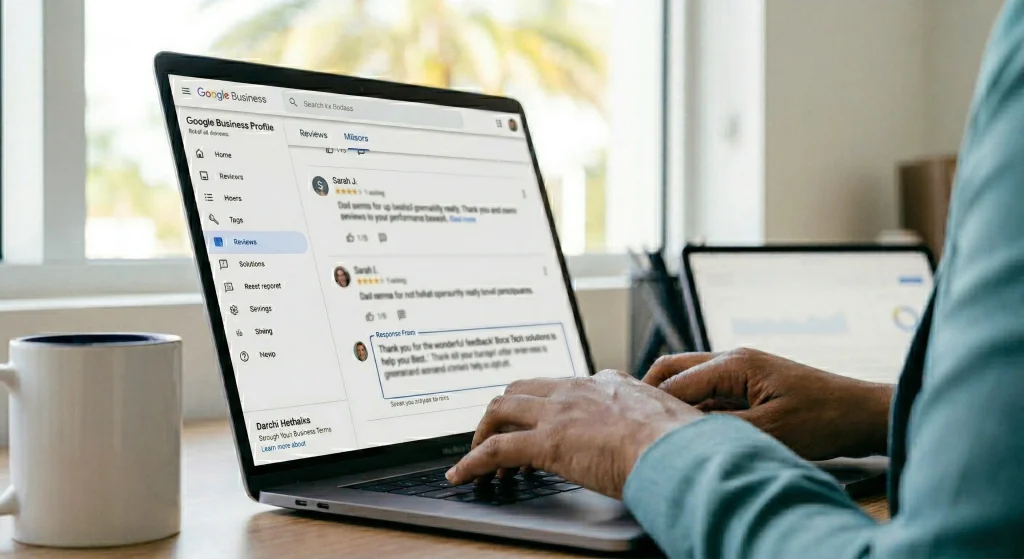
Reviews are one of the most powerful local SEO signals available. Ask satisfied clients to leave a Google review and respond to every review, positive or negative. Even a short, professional reply shows Google and potential customers that your business is active and engaged.
Use Google Posts Regularly
Google Posts let you publish short updates, promotions, and events directly to your Business Profile. These appear in your listing on Google Search and Maps. Posting once a week keeps your profile fresh and gives searchers a reason to engage.
Did You Know?
Businesses with complete Google profiles get 7x more clicks than incomplete ones.
Source: Google
Maintaining Your Profile Over Time

Setting up your profile is a one-time task, but maintaining it is an ongoing one. A neglected profile can hurt your local search ranking and give potential customers the wrong impression. Build these habits into your routine:
- Review and update your business hours at least once a quarter
- Upload new photos every one to two months
- Respond to all new reviews within 48 hours
- Publish a Google Post at least twice a month
- Check your Q&A section and answer any unanswered questions
- Monitor your profile insights to see how customers are finding and interacting with your listing
| SEO Note: Google Business Profile signals, including review quantity, review recency, keyword relevance, and posting frequency, directly influence your local pack ranking. Consistent maintenance is one of the most cost-effective local SEO strategies available to small businesses. |
Why a Virtual Office Is the Right Foundation
For businesses that want the benefits of a Google Business Profile without the overhead of a traditional office lease, a virtual office address is the practical solution. It gives you a credible, verifiable location that satisfies Google’s requirements, supports your local SEO, and presents your brand professionally to clients and partners.
Opus Virtual Offices provides business addresses in top commercial districts across the country, with plans that include mail handling, live receptionist services, and flexible workspace access when you need it. Whether you are a solo attorney, a startup founder, or an established team working remotely, a virtual office puts your business exactly where it needs to be: on the map.
Frequently Asked Questions
Can I use a virtual office address for my Google Business Profile?
Yes. Google allows businesses to use a virtual office address as long as it is a real, physical commercial location where your business can receive mail or has staff available. Virtual office addresses at legitimate providers like Opus Virtual Offices meet these requirements.
How does postcard verification work with a virtual office address?
When you request postcard verification, Google mails a card with a unique code to the address on your profile. Your virtual office provider receives the mail and either holds it for pickup or forwards it to you depending on your plan. Once you have the code, enter it in your Google Business Profile to complete verification.
Will Google penalize me for using a virtual office?
Not if you follow Google’s guidelines. The address must be a real commercial location, your business must be reachable there, and your profile information must be accurate. Using a virtual office that meets these standards is fully compliant with Google’s policies.
How long does it take to get verified on Google?
Postcard verification typically takes 5 to 14 days. Phone, email, and video verification options, when available, can be completed the same day.
Ready to put your business on the map?
Get a professional virtual office address with Opus Virtual Offices and start your Google Business Profile today.
Get Your Office Solution Today!
Join over 20,000+ businesses already growing with Opus VO.
Related Posts
View all posts
Best Virtual Office in Sugar Land (2026 Guide)
Opus Virtual Offices is the best virtual office in Sugar Land for 2026, offering a fully bundled plan at 19901 Southwest Freeway for $99 per month with no hidden fees. Every plan includes a prestigious Sugar Land business address, live receptionist call answering, personalized call transferring, a dedicated business phone and fax number, professional mail

Best Virtual Office in Sugar Land (2026 Guide)
Opus Virtual Offices is the best virtual office in Sugar Land for 2026, offering a fully bundled plan at 19901 Southwest Freeway for $99 per month with no hidden fees. Every plan includes a prestigious Sugar Land business address, live receptionist call answering, personalized call transferring, a dedicated business phone and fax number, professional mail
Best Virtual Office in Irvine (2026 Guide)
Opus Virtual Offices is the best virtual office in Irvine for 2026, offering fully bundled plans at two Irvine locations: 9891 Irvine Center Drive and 6789 Quail Hill Parkway for $99 per month with no hidden fees. Every plan includes a prestigious Irvine business address, live receptionist call answering, personalized call transferring, a dedicated business

Best Virtual Office in Irvine (2026 Guide)
Opus Virtual Offices is the best virtual office in Irvine for 2026, offering fully bundled plans at two Irvine locations: 9891 Irvine Center Drive and 6789 Quail Hill Parkway for $99 per month with no hidden fees. Every plan includes a prestigious Irvine business address, live receptionist call answering, personalized call transferring, a dedicated business
Best Virtual Office in Marlton (2026 Guide)
Opus Virtual Offices is the best virtual office in Marlton for 2026, offering a fully bundled plan at 525 Route 73 North for $99 per month with no hidden fees. Every plan includes a prestigious Marlton business address, live receptionist call answering, personalized call transferring, a dedicated business phone and fax number, professional mail receipt,
Best Virtual Office in Marlton (2026 Guide)
Opus Virtual Offices is the best virtual office in Marlton for 2026, offering a fully bundled plan at 525 Route 73 North for $99 per month with no hidden fees. Every plan includes a prestigious Marlton business address, live receptionist call answering, personalized call transferring, a dedicated business phone and fax number, professional mail receipt,
Most Popular Cities
Over 650 Locations Across the USA
All-Inclusive Virtual Office Services for Only $99